Engineered like a real studio tool, not a gimmick.
Every stage in Atout APO is tuned for USB and onboard (Realtek) audio, the setup most Windows PCs actually use, and designed for accuracy first. Here's what's under the hood. Bluetooth headphones/speakers and professional audio interfaces are not supported in v1 — see requirements.
Up to 8-band parametric EQ
Shape tone with up to 8 fully parametric bands, each switchable between Low-Cut, Low Shelf, Peak, High Shelf, and High-Cut, for real tonal control over anything playing on your PC.
A real-time spectrum overlay sits directly on the EQ graph, so you can see exactly what's happening in your audio as you adjust every band — no separate analyzer window needed.


Dynamic EQ — Sub & Air
Two dedicated Dynamic EQ bands — Sub and Air — automatically duck low-end rumble or harsh highs when they cross your threshold, so correction only kicks in when it's actually needed.
Each band gives you Frequency and Duck amount, so you can dial in exactly how much correction happens and where. A live spectrum on the Dynamic EQ graph shows the same audio as the EQ view.
Compressor
Full manual control over Threshold, Ratio, Attack, and Release, backed by Thresh/GR/Out metering so you always see exactly how much gain reduction is happening.
Use it to tame peaky sources, even out inconsistent volume across apps, or gently glue playback together.

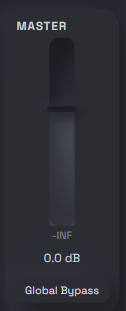
Master & Global Bypass
Master sets the overall output level after EQ, Dynamic EQ, and Compressor. Global Bypass turns the whole processing chain off so you can A/B against untreated system audio without closing the app.
Stereo Field
A live L–R view of how energy is sitting in the stereo image. It reflects how a game or app mixed the audio — a rough visual reference, not a precise direction finder.

How Atout APO works
Windows Audio Processing Object
Atout APO installs as an APO on your active playback devices, so it processes audio for the whole system in Windows shared mode — not just one app. Apps using WASAPI Exclusive or ASIO bypass this path.
Real-time, low latency
Processing happens in the audio pipeline itself, designed to keep added latency low enough for gaming and video without noticeable lag.
Presets
Save your EQ, Dynamic EQ, Compressor, and Master settings as a preset, then load them back anytime — or reset to default with one click.
9 languages, tooltips you can toggle
The UI is available in English, 한국어, 日本語, 中文, Deutsch, Русский, Español, Français, and Português. Hover tooltips explain every control, and can be switched on or off from Settings.